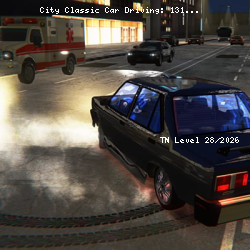
Play City Classic Car Driving: 131 No Download Needed
BoneCracker Games • 173.5K Plays • 520.5K Views • star 4.6 (7.5K)
All
Device
7.5K ratings
Rate This Game
gamepad How to Play City Classic Car Driving: 131
Controls
- W or up arrow key = accelerate
- A or left arrow key = turn left
- D or right arrow key = turn right
- S or down arrow key = reverse
- F = nitro
- G = slow motion
- Space = handbrake
- B = look back
- I = start / stop the engine
- C = change camera
- Q = left sign
- E = right sign
- Z = hazard sign
- T = toggle on / off sirens
- OP = use air suspensions
- L = use low beam headlights
- K = use high beam headlights
info About City Classic Car Driving: 131
Players can start experiencing City Classic Car Driving: 131 directly on TNLVL. City Classic Car Driving: 131 clearly shows the advantage of browser games: fast access and an easy start. If you are looking for a light but addictive Driving, 3D, Car, Racing, Drifting, Speed, Police, Mission game, try City Classic Car Driving: 131.
City Classic Car Driving: 131 features engaging mechanics and smooth controls for all skill levels. unity serves as the foundation that allows City Classic Car Driving: 131 to operate efficiently. Players often find many interesting elements in Grand Cyber City and Bit Gun.io.