Play ColorTris Anytime
New Media XP • 85.8K Plays • 686.2K Views • star 4.4 (6.1K)
All
Device
6.1K ratings
Rate This Game
gamepad How to Play ColorTris
Controls
Full controller support : Can be played with keyboard, mouse, touch, gamepad, etc.
Go back, close menu, pause game
- Keyboard - [ Esc / X / Numpad - ]
- Gamepad - [ Cancel (East) ]
Click or press menu buttons
- Keyboard - [ Submit (Enter) / Space ]
- Gamepad - [ Submit (South) ]
Navigate menu buttons
- Keyboard - [ WASD / Arrow keys ]
- Gamepad - [ D-pad / Any stick ]
Move left
- Keyboard - [ A / Left arrow ]
- Gamepad - [ D-pad Left / Any stick Left ]
Move right
- Keyboard - [ D / Right arrow ]
- Gamepad - [ D-pad Right / Any stick Right ]
Move down
- Keyboard - [ S / Down arrow ]
- Gamepad - [ D-pad Down / Any stick Down ]
Slam down
- Keyboard - [ Shift / K ]
- Gamepad - [ West ]
Rotate clockwise
- Keyboard - [ W / L / Up arrow ]
- Gamepad - [ North / D-pad Up / Right shoulder ]
Rotate anti-clockwise
- Keyboard - [ Ctrl / J ]
- Gamepad - [ Left shoulder ]
Full screen / window mode
- Keyboard - [ F11 ]
info About ColorTris
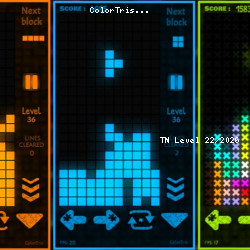
A browser experience designed for fans of free game online. ColorTris captures the feeling often associated with classic Puzzle games, Tetris, Controller, Color, 2D, Skill titles.
ColorTris works perfectly for players looking for quick entertainment sessions. The actual experience of ColorTris feels quite convenient because everything is contained within the browser.
Play ColorTris now on TNLVL and discover new challenges. From ColorTris, you can branch out to similar options like Lunar Knight and Nut Sort: Build the City.